AbsolutelyRad.exe
Beta Release
Request Access
Please provide your information to access the download. This helps us understand our community and prevent automated downloads.
✓ Thank you! Your download is ready.
Having trouble? Visit our GitHub releases page
First-Time Installation Guide
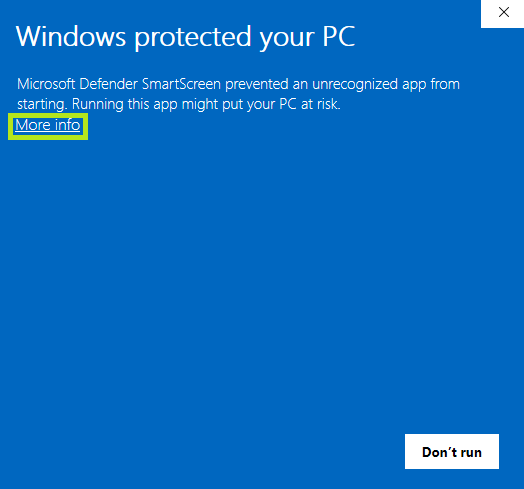
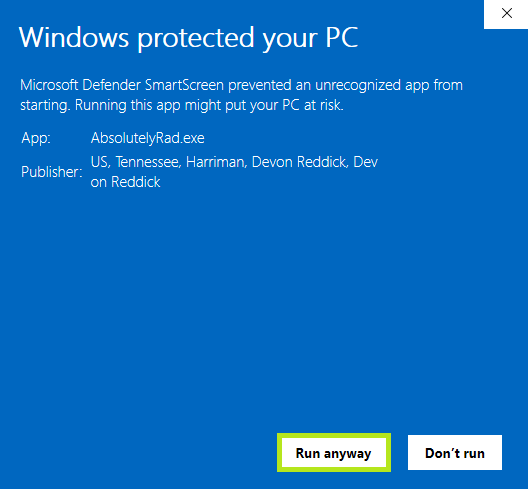
Important: Our application needs time to build trust with Microsoft. We apologize for the inconvenience, but you can still run the application. On the first run of AbsolutelyRad.exe, you will be presented with these screens. The More Info button will take you to the Run Anyway option. This will be the only time Windows will ask your permission. Thank you for your patience.
Step 1: Initial Windows SmartScreen Warning
When you first run AbsolutelyRad.exe, Windows Defender SmartScreen will show this warning. Click "More info" to proceed.
Step 2: Run Anyway
After clicking "More info", you'll see the "Run anyway" button. Click it to launch the application.
After this one-time setup, the app will launch normally with no warnings.
How will it run on my PC
- Potato: Very slow but usable for learning, be very patient
- Old Laptop: Works with occasional image lag and slower use case renders, be patient <3
- Beefy Laptop: Smooth experience, quicker loading on image shifts
- Old PC: Functional with minor delays
- Gaming PC: Excellent performance, fast image shift response